Unit-wide Announcements / Headquarters
Re-introducing Skill Ratings

Today we are re-introducing Skill Ratings, a system that connects what instructors observe in the field directly to individual skill progression. In plain terms: if you play well, you can progress faster. If something needs work, you will know exactly what, and exactly how to fix it. It is launching now, in calibration mode.
Important: Calibration (Shadow) Mode
The Skill Ratings system is live and fully working. Instructors can issue ratings, members can see them, and every page described below is available now. However, no rating currently changes anyone's SP requirements or deployment access. The system records and displays everything while Training Command and the training teams calibrate the numbers. It will only begin affecting access when TC and the training teams are satisfied and switch it on. You will be told before that happens.
The Short Version
Instructors can now rate your individual skills based on what they observe in operations and FTX sessions, either positively (performing above expectations) or negatively (something to work on). Every rating comes with a written comment explaining what was seen.
A rating never touches the SP you have earned. Instead, it moves the requirement bar for that one skill, just for you:
- A positive rating lowers the requirement, so you can qualify for roles sooner.
- A negative rating raises the requirement, and you work it back down by playing.
What this means in practice depends on who you are:
- New members with real ability no longer have to grind past a bar set for beginners. Demonstrate it in the field and the bar moves for you.
- Established members lose nothing. Your earned SP is untouched, and a rating can never on its own remove you from a role.
- Members working on a weakness get a clear, finite path back: play the skill, prove the fix, done. Nothing lingers on your record once cleared.
- Instructors and training teams finally have a tool with teeth. What you see at an FTX now feeds directly into who qualifies for what in your area.
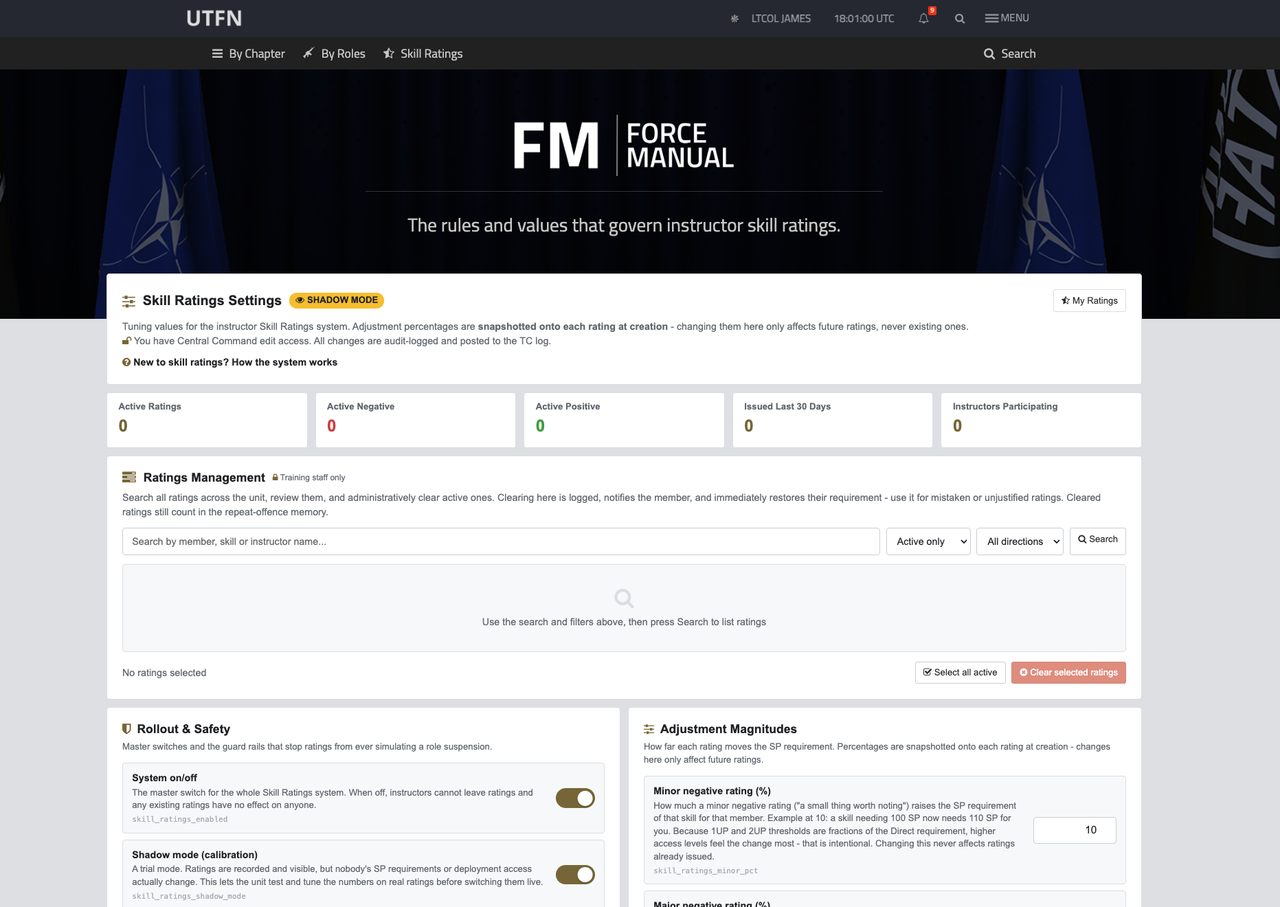
Everything about how the system is tuned is published for everyone to read on the Ratings System page.
Where You'll See Ratings
On your role card, every skill chip now links to a full Skill Record page, and skills with an active rating show a flag: red for something to work on, green for recognition. You will never discover a rating by accident or hear about it second-hand.
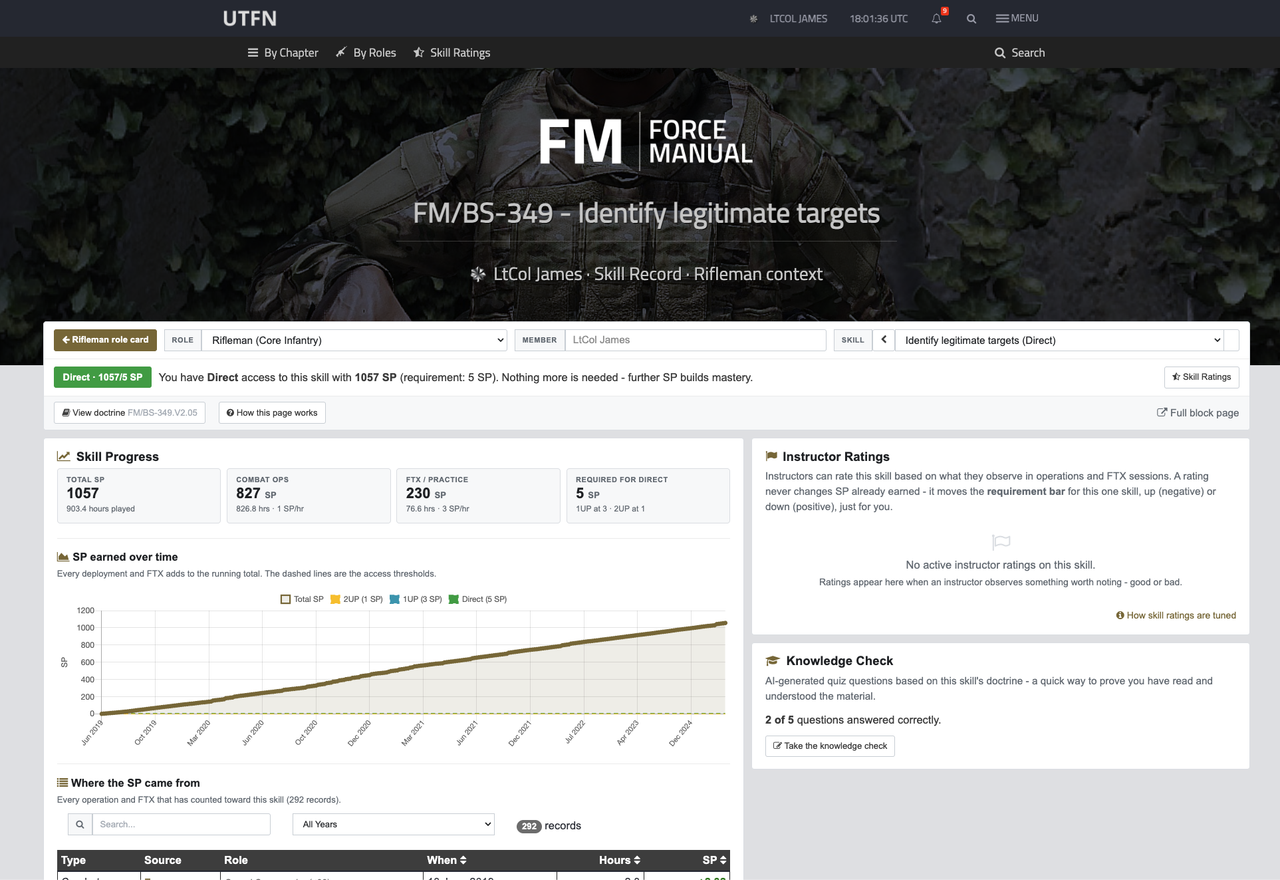
The Skill Record page is the new home for everything about one skill: your access level and status, an SP-over-time chart with the access thresholds drawn on it, every operation and FTX that has counted toward the skill, the doctrine itself (expandable in place), your knowledge check progress, and any instructor ratings with exactly what they mean and how to clear them. One page answers "where am I with this skill and what do I do next".
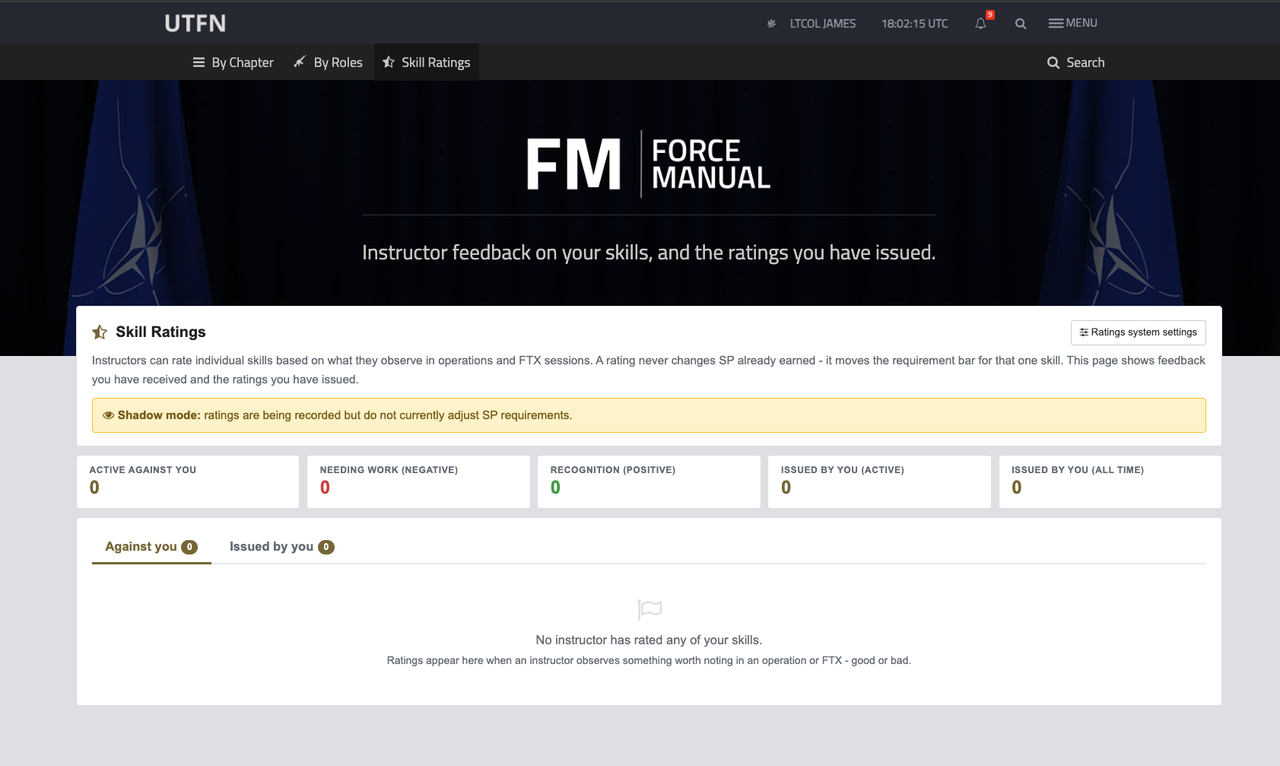
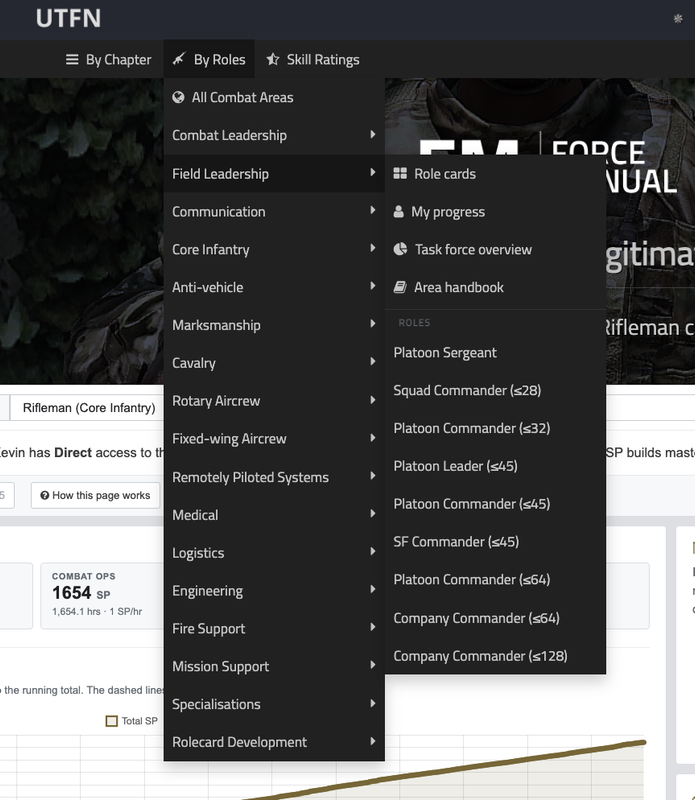
The Skill Ratings hub, linked in the Force Manual navigation as "Skill Ratings", shows every rating issued against you: who issued it, why, its effect, and your clearing progress. On Discord, you will receive a DM the moment a rating is created on you (including the instructor's comment) and again when it clears, with a direct link to the skill record in question.
Faster Progression: Positive Ratings
If an instructor sees you are clearly proficient in a skill, whether through prior experience or performing well above your current SP level, they can rate it positively. That lowers the SP requirement for that skill, just for you, which can unlock role access weeks earlier than SP alone would.
Positive ratings expire after a set period. If your natural SP has caught up by then, nothing changes, because you have earned the access outright. If it hasn't, the requirement returns to normal.
For example: a new member shows strong fire-and-movement fundamentals from day one. After their second FTX, an instructor rates the skill positively. The requirement drops and they qualify for Fireteam Leader access early. Over the following weeks their earned SP overtakes the boost, which then expires without effect.
Corrective Action: Negative Ratings
If an instructor observes a problem, say entering a building without stacking, they can rate the skill negatively, with a comment explaining exactly what they saw. The SP requirement for that skill rises for you, which may lower your access level on roles that use it. You get a specific, named thing to fix, with a defined way out.
You clear a negative rating three ways, and they combine:
-
Deploy. Earn SP in that skill through operations and FTXs that use it. The rating fades with SP earned, never with time alone. You cannot wait it out; you have to practise the skill.
-
Knowledge check. For a first-time rating on a skill, completing that skill's knowledge check quiz credits SP toward clearing it, as proof you have re-read and understood the doctrine. Answers only count first-time (or after a cooldown between attempts), and this path can only be used once per skill per year.
-
Instructor review. A different instructor who directly sees you perform the skill correctly, at an FTX for example, can review and clear the rating on the spot, with a comment. You should not have to wait weeks for numbers to catch up with behaviour you have already fixed.
Your Skill Record shows a clearing progress bar and spells out which paths are available at any moment. You always know how far you are from clear.
Repeat issues cost more. If the same skill is rated negatively again within twelve months, the adjustment is steeper, more SP is needed to clear it, and the knowledge-check shortcut is no longer available. The first time is a learning opportunity; the second requires demonstrated improvement in the field.
Escalation cap. For experienced members whose banked SP is far above a skill's requirement, percentage adjustments alone may not move their access. When enabled, repeated offences, or the same concern raised independently by multiple instructors, cap access to that skill at 1UP until the rating is cleared, regardless of SP. Seniority no longer makes anyone unreachable on standards. You can still deploy into affected roles later in the release window.
Fairness Guardrails
One instructor having a bad day cannot tank your access:
- Your earned SP never changes. Ratings move the bar, not your record.
- Every rating requires a written comment, is DM'd to you, and is permanently logged.
- No single rating can remove you from a role. There is a hard ceiling on the total adjustment, and a full role suspension remains a command-level decision.
- No instructor can rate themselves, hold more than one active rating per skill on you, or clear their own rating.
- The full rulebook, every percentage, threshold and timer, is publicly readable by any member on the Ratings System page.
For Training Team Members
If you run training in a combat area, this system is for you. Until now, spotting a problem at an FTX or seeing genuine talent early gave you nothing to act with beyond a conversation. Now both feed directly into progression in your area, and you can protect the standard of the roles you are responsible for.
Who can rate: Instructors of a combat area can rate any skill used by that area's roles, whether the skill is tier-mapped to the area, directly assigned to its roles, or (configurably) picked up through role inheritance. Observers cannot issue ratings by default, as observing is for watching and learning, though this is a setting the training teams may change. A minimum instructor seniority can be configured; by default all instructors may rate.
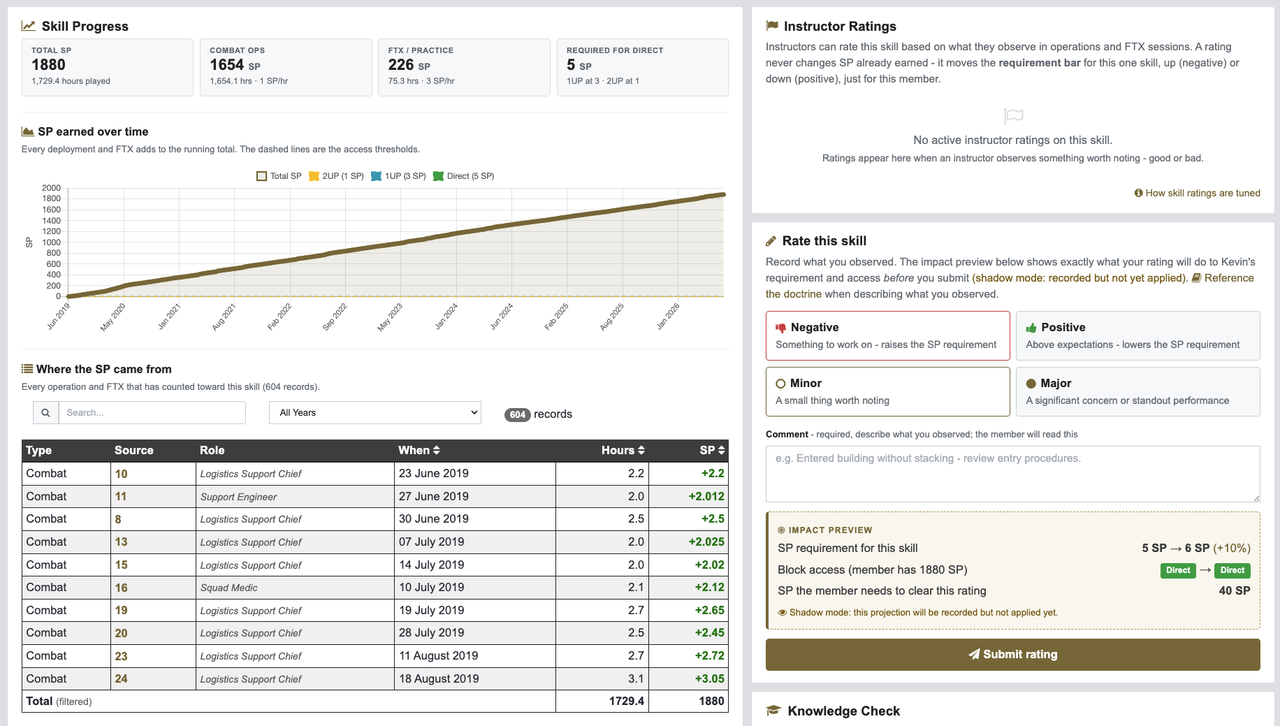
How to rate: Open the member's role card and use the star action on any skill chip. It takes you straight to the rating form on their Skill Record. The form asks three things: direction (negative, needs work / positive, above expectations), significance (minor, a small thing worth noting / major, a significant concern or standout performance), and a comment, which is mandatory and which the member will read.
Before you submit, the live impact preview shows exactly what your rating will do: the requirement before and after, the member's access level before and after, how much SP they will need to clear it, and warnings if this is a repeat offence or would trigger the escalation cap. You see the consequence before you commit to it, so you can judge whether it matches the seriousness of what you saw.
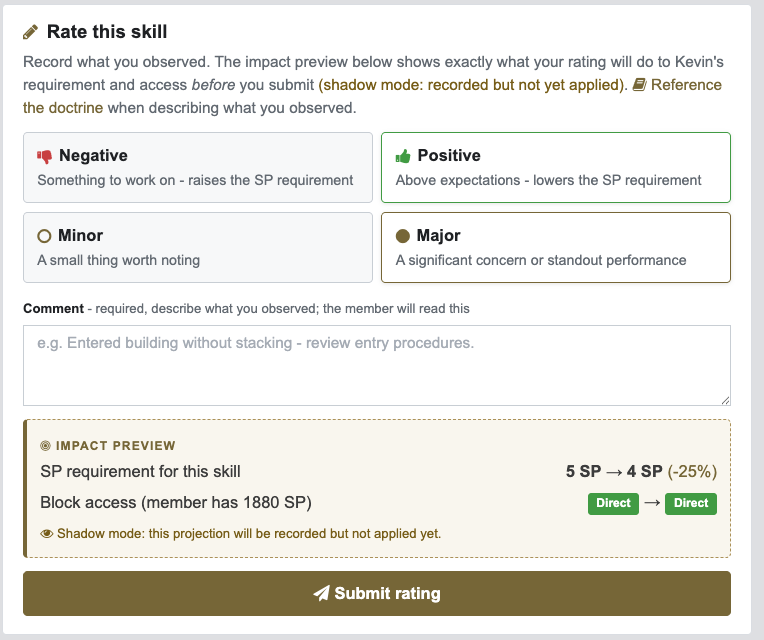
The doctrine is expandable on the same page, so you can reference the exact procedure in your comment without losing your place.
Reviewing and clearing: If you directly observe a member perform a rated skill correctly, and you are not the instructor who issued the rating, you can review and clear it from their Skill Record with a comment. Members who have fixed a problem get credit for it as soon as someone sees it, and both the original rating and your review are logged.
Tracking what you've issued: The Skill Ratings hub has an "Issued by you" tab: every rating you have made, its current status, the member's clearing progress, and who reviewed it. You see the outcome of every rating you issue.
Oversight (J7 / TC / CC)
Training staff have a Ratings Management panel on the Ratings System page: search every rating across the unit, filter by status and direction, and administratively clear mistaken or unjustified ratings in bulk, with a mandatory reason that is logged, sent to the member, and posted to the TC log. If a rating should never have been issued, it can be undone quickly and the member is told why.
Every action in the system (create, clear, review, settings change) is audit-logged, and rating activity can be mirrored to the J7 staff channel.
Rollout
Training Command and the training teams will use this period to tune the numbers against real ratings. When they are satisfied, the system will be switched live and adjustments will take effect. You will be notified before that happens. Questions about a specific rating belong with the issuing instructor or your combat area's training team. Questions about the system itself belong with J7 / Training Command.
Quick Reference
| Page | Where | Who |
|---|---|---|
| Skill Record | Via any role card skill chip | Everyone (rating form: instructors) |
| Skill Ratings hub | Force Manual nav, "Skill Ratings" | Everyone ("Issued by you" tab: raters) |
| Ratings System (settings & management) | /handbook/skill_ratings_settings | View: everyone · Manage ratings: J7/TC/CC · Change settings: CC |
Full Changelog
- Introduction of the Skill Ratings system: instructor-issued positive and negative ratings on individual skills.
- New Skill Record page for every skill, accessible from role card skill chips.
- New Skill Ratings hub with "Against you" and "Issued by you" tabs.
- Live impact preview on the rating form, showing consequences before submission.
- Three combinable clearing paths for negative ratings: SP earned, knowledge check, and instructor review.
- Positive ratings with automatic expiry, acting as a bridge to earned access.
- Repeat-offence escalation and configurable escalation cap.
- Ratings Management oversight panel for J7 / TC / CC with full audit logging.
- Discord DM notifications on rating creation and clearance.
- Publicly viewable system settings with plain-language explanations and worked examples.
The Settings, In Full
Below is every setting in the system as it launches. These are the launch values. The training teams may tune them during calibration, and the Ratings System page always shows the live values.
Rollout & Safety
The master switches, and the guard rails that stop ratings from ever becoming a suspension.
| Setting | Launch value | What it means |
|---|---|---|
| System on/off | On | The master switch. When off, instructors cannot leave ratings and existing ratings have no effect on anyone. |
| Shadow mode (calibration) | On | The trial mode we are launching in. Ratings are recorded and visible, but nobody's SP requirements or deployment access actually change. This will be switched off when TC and the training teams are satisfied, and you will be told first. |
| Maximum total effect | 60% | The safety ceiling. No matter how many ratings stack up on one skill, its requirement can never be moved by more than this in either direction. This is why ratings can lower your access level but can never lock you out of a role entirely. |
| Ratings on 0-SP skills | Off | Some skills need 0 SP, so everyone automatically holds Direct access to them. This controls whether a negative rating can create a requirement on those skills at all. While off, ratings on 0-SP skills have no mechanical effect. |
| 0-SP skill stand-in value | 50 SP | Only matters if the setting above is turned on. Because a percentage of zero is still zero, the rating's percentage is applied to this stand-in value instead. For example, a minor negative (10%) would create a 5 SP requirement on a skill that normally needs none. |
Adjustment Magnitudes
How far each rating moves the requirement bar. These percentages are locked onto each rating at the moment it is created, so later tuning never moves ratings already issued.
| Setting | Launch value | What it means |
|---|---|---|
| Minor negative rating | +10% | A small thing worth noting. Raises the skill's requirement by this much, just for you: a 100 SP skill becomes 110 SP. Because 1UP and 2UP thresholds are fractions of the Direct requirement, higher access levels feel the change most, by design. |
| Major negative rating | +25% | A significant concern. Raises the requirement by this much: a 100 SP skill becomes 125 SP. |
| Minor positive rating | -10% | Performing above expectations. Lowers the requirement by this much, helping you qualify sooner: a 100 SP skill becomes 90 SP. |
| Major positive rating | -25% | Clearly proficient, for example proven prior experience. Lowers the requirement by this much: a 100 SP skill becomes 75 SP, which can unlock access weeks earlier than SP alone would. |
| Multiple-instructor bonus | +25% per extra instructor | When two or more different instructors independently rate the same skill the same way, the system treats it as a stronger signal and boosts the combined effect: two instructors count 1.25x, three count 1.5x. One instructor can never stack with themselves. A new rating from the same instructor replaces their previous one. |
| Repeat offence multiplier | 1.5x (compounding) | A negative rating on a skill you were already rated on within the memory window hits harder each time: the first repeat is 1.5x, the second 2.25x. It also takes more SP to clear. |
| Rating memory | 365 days | How long the system remembers previous ratings on a skill, even after they are cleared, when deciding whether a new rating counts as a repeat and whether the knowledge-check shortcut is still available. |
Clearing Paths
How members work through a negative rating: deployment, the knowledge check, and instructor review.
| Setting | Launch value | What it means |
|---|---|---|
| SP needed to clear | 1.0x | How much SP you must earn in the rated skill (deploying in roles that use it, or FTXs that cover it) to clear a negative rating. The formula is skill requirement × rating % × this factor. At 1.0, a minor (10%) rating on a 100 SP skill clears after 10 SP of clean deployment. Ratings never fade with time alone, only with SP earned. |
| Knowledge check clearing | On | Whether a first-time negative rating can be cleared (or partly cleared) by completing the skill's knowledge check quiz, proving you have re-read and understood the doctrine. Repeat offences never qualify for this shortcut. |
| Knowledge check credit | 5 SP | The SP credited toward clearing when the knowledge check is completed. Enough to fully clear a minor rating on a small skill, or make a dent in a major one. The rest comes from deployment or instructor review. |
| Knowledge check: once per skill | On | The knowledge-check shortcut can only be used once per skill within the memory window, even across separate ratings. This stops anyone making the same mistake, passing a quick quiz, and carrying on as before. |
| Knowledge check retry wait | 12 hours | A correct quiz answer only counts toward clearing your rating if you got it right on your first try, or after waiting this long since your last attempt on that question. This stops the quiz being brute-forced. Normal quiz practice is unaffected. |
| Instructor review clearing | On | Whether a different instructor (never the one who issued the rating) can review and clear it after directly observing you perform the skill correctly, so you don't wait weeks for numbers to catch up with a fix you have already made. The reviewer must leave a comment, and everything is logged. |
| Positive rating lifespan | 90 days | How long a positive rating lasts. It bridges the gap while your natural SP catches up. If you have earned enough SP by expiry, nothing changes; if not, the requirement returns to normal. |
Escalation Access Cap
The corrective mechanism for members far above the SP threshold, where percentage adjustments alone cannot move access.
| Setting | Launch value | What it means |
|---|---|---|
| Escalation access cap | Configurable at go-live | When triggered (see below), the member's access to the rated skill is capped at the level chosen, no matter how much SP they have banked, until the rating is cleared through the normal paths. A full suspension remains a manual command decision. |
| Cap level when triggered | 1UP | The access level the skill is capped at while active. 1UP means you can still take affected roles later in the release window; 2UP is stricter. |
| Cap on repeat offence | On | The cap triggers when an active negative rating is itself a repeat, meaning the same skill was rated negatively before within the memory window. A first-time rating never triggers the cap on its own. |
| Cap on corroboration | 2 instructors | The cap also triggers when this many different instructors hold active negative ratings on the same skill. At 2, no single instructor can cap anyone alone; it takes independent corroboration. |
| Cap counts major ratings only | On | Only major negative ratings count toward the cap triggers. Minor ratings still adjust the requirement but never contribute to capping access. |
Governance & Notifications
Who can issue ratings, and who hears about them.
| Setting | Launch value | What it means |
|---|---|---|
| Minimum instructor seniority | 1 (all instructors) | The minimum instructor seniority needed to issue ratings. Raising it would restrict rating to senior instructors such as Chief Instructors. |
| Rate inherited skills | Off | Instructors can always rate skills belonging to their combat area. When on, they can also rate skills their area's roles pick up through role inheritance from other areas, which widens the rating pool for shared skills. When off, rating authority stays with the skill's home area only. |
| Observers can rate | On | Whether training team Observers may issue ratings. Observing is for watching and learning, so this is off by default. While off, Observers can view ratings but never issue or clear them. |
| Discord DM notifications | On | You receive a DM whenever a rating is created on you (including the instructor's comment) or cleared (including how), with a direct link to the skill record. |
| Staff channel notifications | On | Rating activity (who rated whom, on which skill, and how severely) is posted to the J7 training staff channel for oversight, so any misuse is visible to the whole training team. |
Please provide any feedback about this update in the usual Discord channels, thanks again.
Lieutenant Colonel James
Chairman
UNITAF
